
📅 Statutory Holidays + Makeup Days
Holiday and makeup-workday labels right on calendar cells — which days you work, which you rest, which are “makeup” — all clear at a glance.
Open the calendar and know if you need to work this weekend.
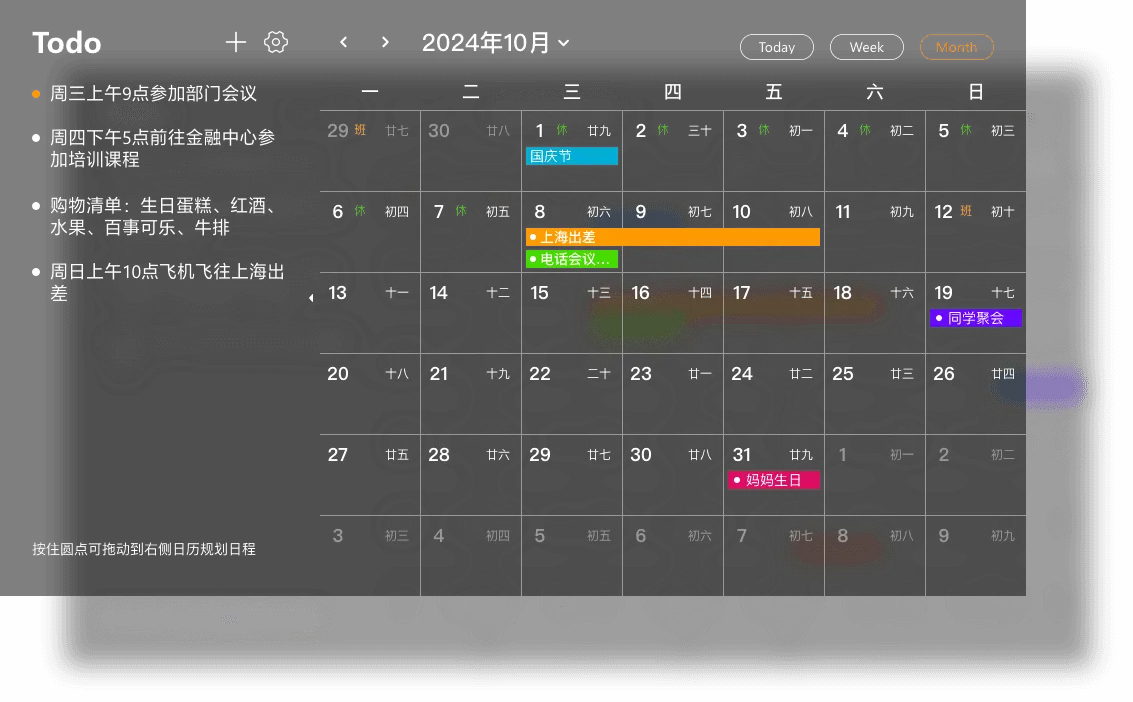
📅 Statutory Holidays + Makeup Days
Holiday and makeup-workday labels right on calendar cells — which days you work, which you rest, which are “makeup” — all clear at a glance.
Open the calendar and know if you need to work this weekend.
🔗 All Your Calendars in One Hub
WeCom, DingTalk, Feishu, Microsoft, Exchange, CalDAV — 6 third-party calendars pulled into one desktop view. Aggregated events can be written back to your phone’s system calendar.
Company uses DingTalk, personal uses Google — see them all on one desktop.
🌤️ Weather + Lunar Overlay
Weather mini-icons displayed directly on calendar cells, with optional lunar calendar overlay. Date, holidays, weather, lunar — all in one view.
Check if the 15th has rain to decide on that outdoor meeting.
🗓️ Month/Week/Day Views + Drag
Default month view, switchable to week view or day view expanded by 24 hours. Click a cell to create a schedule, drag existing schedules to adjust times. The “unscheduled” sidebar auto-collects unplanned todos — drag to a calendar cell to schedule them.
Drag a few times and your week is planned.
🔒 Third-Party Calendars Are Read-Only
Synced third-party calendar events are view-only — no accidental edits to your original data. Any changes must be made in the original calendar service.
Aggregate with confidence — your original calendars stay clean.
3-Month Plan
$10
$3.33/month
1-Year Plan
$28
$2.33/month
Recommended Choice
3-Year Plan
$58
$1.61/month
Best Value for Power Users
5-Year Plan
$88
$1.47/month
Ultimate Savings Plan
iOS / Google Play / PayPal subscriptions do not support refunds. Other channels offer 7-day no-questions refund. See Refund Policy.