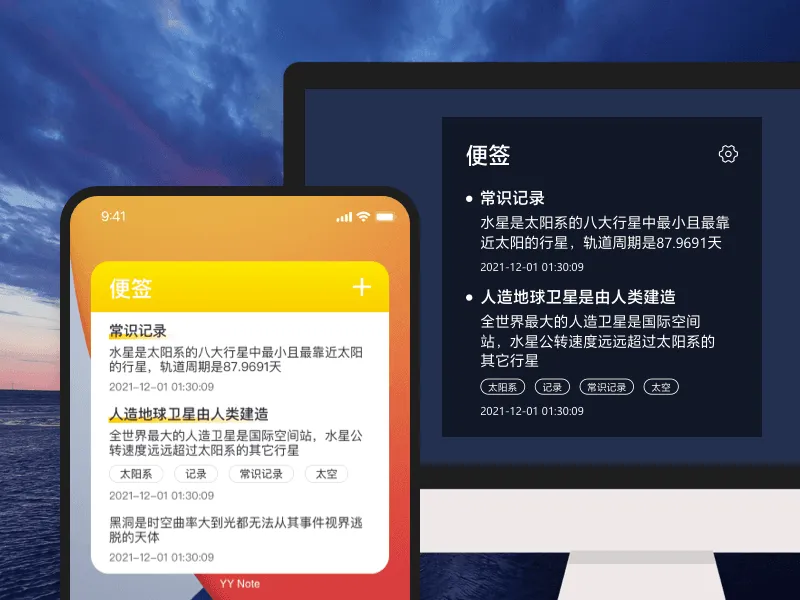
Fully Transparent
The sticky note widget is transparently pinned to your wallpaper. Doesn’t block your wallpaper, doesn’t take up taskbar space.
iOS currently doesn’t support transparency, but the app experience is consistent.

No reminder pressure, no time constraints. Pure text memory — visible the moment you boot up.
Sticky notes are for recording, not for doing. No reminders, no calendar entries, no nudging. It’s just text pinned there — like a Post-it that never falls off.
For things with reminders and deadlines, use Todos. For things you just want to jot down, use sticky notes.
One desktop widget can hold multiple sticky note lists. Work notes in the work list, shopping notes in the shopping list. Switch from the top-left corner to see whichever category you want.
Add tags and find notes across lists. For example, “Project A” notes might be scattered across three lists — filter by tag and they all appear.
Fully Transparent
The sticky note widget is transparently pinned to your wallpaper. Doesn’t block your wallpaper, doesn’t take up taskbar space.
iOS currently doesn’t support transparency, but the app experience is consistent.
Multi-Device Sync
Write on your computer, see it instantly on your phone.
One account, full sync across Windows / Android / iOS / HarmonyOS.
Tag Management
Tag your sticky notes and filter by tags.
One note can have multiple tags — no need for folders.
Minimalist, Distraction-Free
No ads, no popups, no notification badges.
Open and write, close when done — nothing extra.
| Feature | Description |
|---|---|
| Create Note | Floating toolbar on PC / bottom button on mobile |
| Edit Content | Click a note to edit directly |
| Pin & Sort | Drag to reorder notes |
| Auto Archive | Archive by completion date, export all in one click |
| Customization | Adjustable transparency, background color, font size, text color |
| Privacy Hide | Auto-hide when near screen edge · one-key hide with shortcut |
Transparent Desktop Todo →
Transparent Desktop Calendar →
Transparent Desktop Weather →