Skip to content

Transparent Desktop Weather

Glance before heading out — no need to reach for your phone

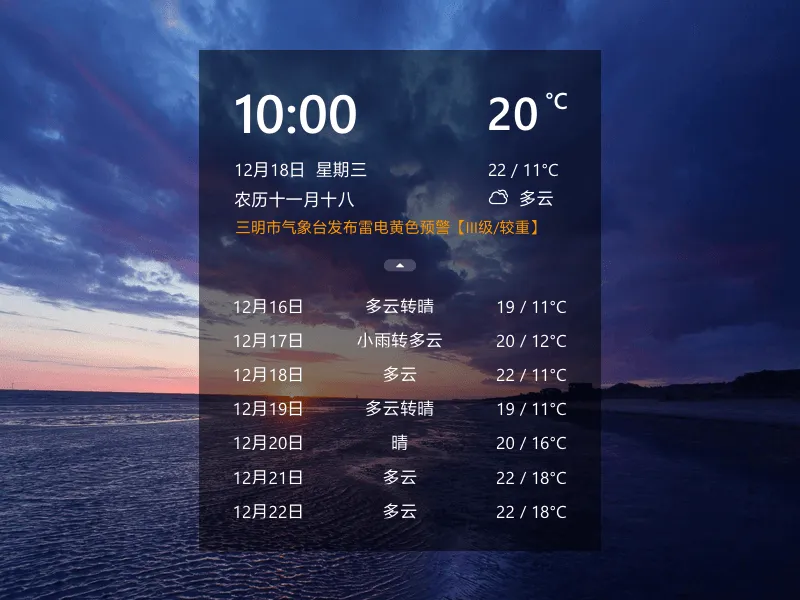
Transparent Desktop Weather screenshot

Paid app, no adsFull features, 7-day free trialTry first, pay later7-day no-questions refund

You glance at your desktop dozens of times a day — yet you open a phone app just to check the weather.

Embed the weather in the corner of your desktop. Current temperature, weekly forecast, extreme weather alerts — one glance tells you everything.


Transparent Embedding in Your Desktop Corner

Section titled “Transparent Embedding in Your Desktop Corner”

The weather widget is compact, floating transparently on your wallpaper. Doesn’t take up the taskbar, doesn’t interfere with any window. Tuck it in a corner, check when needed.

Auto-locates to your city, or manually search to switch. Currently, the transparent floating widget is only supported on Windows. Android users can use it as a home screen widget.


Beyond weather, the widget can also display a digital clock, date, and lunar calendar. You’ll gradually get used to it — check the time without looking at the taskbar, check the calendar without reaching for your phone.


Real-Time Weather + 7-Day Forecast

Current temperature, humidity, air quality.
Weekly weather trends at a glance — plan your outings with confidence.

Extreme Weather Alerts

Early warnings for heavy rain, typhoons, cold waves.
Heavy rain tomorrow? See it in the corner of your desktop today.

Desktop Clock + Countdown

Digital clock + date + lunar calendar, always on your desktop.
Days until your target date — countdown displayed directly.

Auto Location

Shows your city’s weather as soon as you open it.
Auto-switches when traveling, or manually search.


FeatureDescription
Desktop TimeDigital clock + date + day of week + lunar calendar, always on desktop
Calendar IntegrationWeather forecast can display on the desktop calendar
CustomizationAdjustable transparency, background color, font size, text color
Privacy HideAuto-hide when near screen edge · one-key hide with shortcut

Transparent Desktop Sticky Notes →

Transparent Desktop Todo →

Transparent Desktop Calendar →