Timed Popup Reminders
Set a time for your todo — popup notification at the right moment.
No need to rely on memory, never miss anything important.

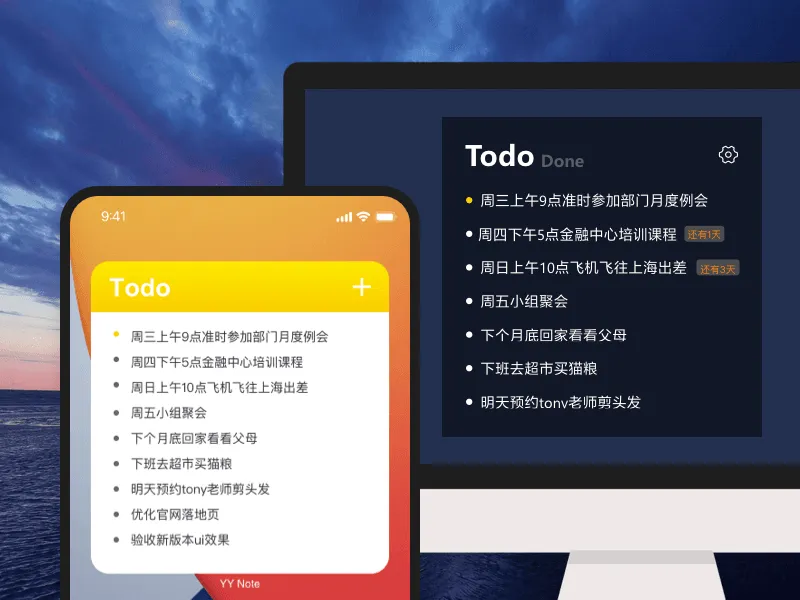
Pin them to your wallpaper — see them every time you look at your desktop. Popup reminders on time, cross them off when done, next one comes up automatically.
The todo list floats transparently on your desktop. Whether you’re dragging files or switching windows, it stays right there. No need to open an app, no need to click the taskbar.
Windows, Android, and HarmonyOS support transparent floating widgets. iOS doesn’t support transparency yet, but the in-app todo experience is complete with real-time data sync.
Organize with lists. One desktop widget can hold multiple lists — work, personal, projects. Switch from the top-left corner, change lists in one second.
Use tags across lists. Tag a todo with “Urgent” and “Project X” — no matter which list it’s in, filter by tag to see it.
Timed Popup Reminders
Set a time for your todo — popup notification at the right moment.
No need to rely on memory, never miss anything important.
Auto-Generated Recurring Tasks
Auto-generate recurring todos daily / weekly / monthly.
Missed tasks during shutdown are intelligently compensated.
Date Countdown
Set a target date and your list shows “X days left”.
Project deadlines, exam countdowns — stronger sense of purpose.
Smart Recognition
Type “Meeting tomorrow at 3pm” — reminder created automatically.
Natural language directly converted to a todo, no manual field filling.
| Feature | Description |
|---|---|
| Pin & Sort | Pin important todos on top, drag to reorder |
| Countdown List | Switch at widget top-left: target date countdown + next 3 holidays |
| Completion Archive | Auto-archive by completion date, export all in one click |
| Auto Tagging | List tags automatically applied when creating new todos |
| Customization | Adjustable transparency, background color, font size, text color |
| Privacy Hide | Auto-hide when near screen edge · one-key hide with shortcut |
Transparent Desktop Sticky Notes →
Transparent Desktop Calendar →
Transparent Desktop Weather →