
Desktop Too Cluttered? Keep Todos Visible Without Getting in the Way
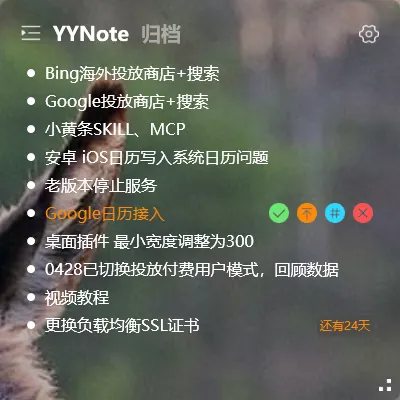
Some people feel that desktop widgets “make the desktop messier.” Usually, it’s just because they haven’t been adjusted properly.
Widgets that are too large, placed in the center, or set to full opacity — all of these can be fixed.
Adjusting Transparency
Section titled “Adjusting Transparency”Desktop widgets support 0% to 100% opacity adjustment.
Higher opacity (closer to 100%): background becomes solid, text is clearer but partially hides the wallpaper.
Lower opacity (closer to 0%): background becomes almost completely transparent, text floats on the wallpaper, barely noticeable unless you look closely.
Suggestion: set it to 10%-20% — text stays clear without interfering with the wallpaper.
Adjusting Size
Section titled “Adjusting Size”Desktop widgets can be freely resized by dragging their edges.
If you only need to glance at a few tasks occasionally, keep it small — just enough to show today’s items, placed in a corner of the screen.
The purpose of a desktop widget is “visible at a glance,” not “fill the entire screen.”
Fixed Positioning
Section titled “Fixed Positioning”Widgets snap to the screen edge by default and can be dragged to any position.
We recommend placing them in an infrequently used corner — like the bottom-right or left side. The bottom-right is ideal: open windows won’t cover it, and a quick glance is all it takes.
Once positioned, the widget will automatically return to the same spot when you restart your computer.
Show Only What Matters
Section titled “Show Only What Matters”In list settings, you can set tag filter rules to display only items with specific tags.
For example, show only the “Must Do Today” tasks and temporarily hide everything else. The widget displays only the most important items — your desktop won’t become another information dumping ground.
Important Notes
Section titled “Important Notes”- iOS does not support transparent desktop widgets due to system limitations. Transparency customization is available on Windows.
- Desktop plugins do not support right-click context menus — all settings are accessed via the system tray icon or dashboard settings.
- The widget is designed to be a glanceable tool, not a permanent focus-stealing element on your screen.
Final Thoughts
Section titled “Final Thoughts”No flashy new features, just continuous refinement. A desktop widget is a tool that can be tuned to feel just right, not a burden that clutters your screen.