
What is YYNote? Transparent Desktop Todo, Sticky Notes & Calendar Tool
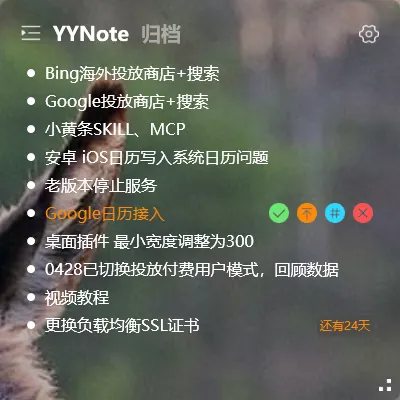
Many people struggle with losing track of their tasks every day.
Write it in your head? Easy to forget. Save it in WeChat memos? Too much switching. Use a dedicated app? You have to open the app first to see anything.
YYNote solves one thing: keeping your tasks right in front of you.
What is YYNote
Section titled “What is YYNote”YYNote is a Windows desktop tool that lets todos, sticky notes, and calendar appear as transparent floating widgets, embedded directly on your Windows desktop.
No need to open any window or switch between apps — as long as your computer is on, you can see today’s todos, tomorrow’s schedule, and any notes you’ve jotted down, all on your desktop.
Three Core Features
Section titled “Three Core Features”Desktop Todo List
Your todo list floats transparently on the desktop. Click directly on the desktop to create, check off, or set reminders. No app to open — todos are always at your fingertips.
Desktop Sticky Notes
Sticky notes are also transparent widgets. They sit quietly on your desktop when not needed, and can be edited directly when you need them. Perfect for temporary ideas, meeting notes, and shopping lists.
Desktop Calendar
Month, week, and day views. See your monthly schedule at a glance on the desktop. Drag todos onto the calendar to quickly convert them into scheduled events.
What Makes YYNote Different
Section titled “What Makes YYNote Different”Regular todo apps are essentially a “box” — your tasks live inside the box, and you have to open it to see what’s there.
YYNote spreads your tasks out on the desktop — the content is directly visible without any active action needed.
This difference sounds simple, but the experience is completely different.
Supported Platforms
Section titled “Supported Platforms”- Windows: Full support with transparent desktop plugins
- Android / iOS / HarmonyOS: App with full todo and sticky note functionality
- Cross-device data sync
Login Methods
Section titled “Login Methods”Supports login via WeChat, QQ, Huawei, Google, Apple, and Microsoft accounts.
Membership
Section titled “Membership”Upon registration, you get an instant 7-day full-feature trial. Experience all features, then subscribe only if it works for you.