
QuickNote Pro Alternative: Sticky Notes & To-Do App Worth Trying
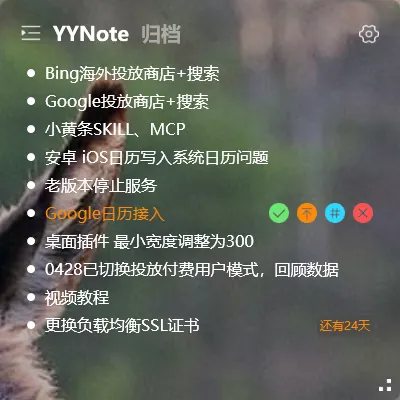
If you’ve been searching the App Store for QuickNote Pro, or you’re already using it but want something that works better on your actual computer desktop — this one’s for you.
QuickNote Pro is Good on iOS, But It Stops There
Section titled “QuickNote Pro is Good on iOS, But It Stops There”QuickNote Pro is a solid note-taking app on iOS. The problem: most people use sticky notes and to-do lists on their computer desktop. You fire up your PC, see what’s on your plate today, and jot down ideas as they come.
QuickNote Pro doesn’t have a Windows version. If you want a sticky note and to-do tool that lives on your desktop screen, you need an alternative.
YYNote: A Different Approach
Section titled “YYNote: A Different Approach”YYNote isn’t a clone of QuickNote Pro. It takes a different path entirely:
Transparent desktop integration. Sticky notes and to-dos float directly on your wallpaper — no window borders, no taskbar clutter. Unlike QuickNote Pro’s card-based list view, YYNote feels like you wrote directly on your wallpaper.
Desktop + phone sync. Windows is the main battleground, with desktop widgets transparently embedded on your wallpaper. Your phone (iOS / Android / HarmonyOS) gives you access on the go, with automatic sync.
Todo + sticky notes + calendar + weather. Not just a note-taking tool. Switch between four lists — todos, sticky notes, schedule, and countdown — all from the desktop widget. Plus standalone calendar and weather widgets.
QuickNote Pro vs YYNote
Section titled “QuickNote Pro vs YYNote”| Feature | QuickNote Pro | YYNote |
|---|---|---|
| Desktop app | ❌ No Windows version | ✅ Windows desktop widget |
| Mobile app | ✅ iOS | ✅ iOS + Android + HarmonyOS |
| Desktop visibility | — | ✅ Transparent on wallpaper, always visible |
| Notes | ✅ Note-taking | ✅ Notes + todos + calendar |
| Cross-device sync | ❌ iOS only | ✅ Real-time sync across 4 platforms |
| Free trial | Depends on version | ✅ 7-day full-feature free trial |
| Pricing | In-app purchase | $28/year |
What QuickNote Pro Users Get by Switching
Section titled “What QuickNote Pro Users Get by Switching”- A sticky note that lives on your desktop — no app to open, always visible on your wallpaper
- Notes and todos in one place — stop switching between two apps
- Your notes on your phone — open YYNote on iOS to see what’s on your desktop
- Tag-based organization — tag your notes and todos, filter by tags
Who YYNote Is For
Section titled “Who YYNote Is For”- You used QuickNote Pro on iOS and want a Windows desktop version
- You want to-dos and sticky notes always visible on your desktop
- You need your notes and tasks synced between desktop and phone
If you mostly take notes on your phone and don’t need a desktop tool, QuickNote Pro works fine. If you want something that works across your Windows PC and phone, give YYNote a try.
Download and try all features free for 7 days. Pay only if you’re satisfied.
More on sticky notes: Best Desktop Sticky Note Software