
Desktop Calendar Sticky Notes: Combine Schedule and Memos
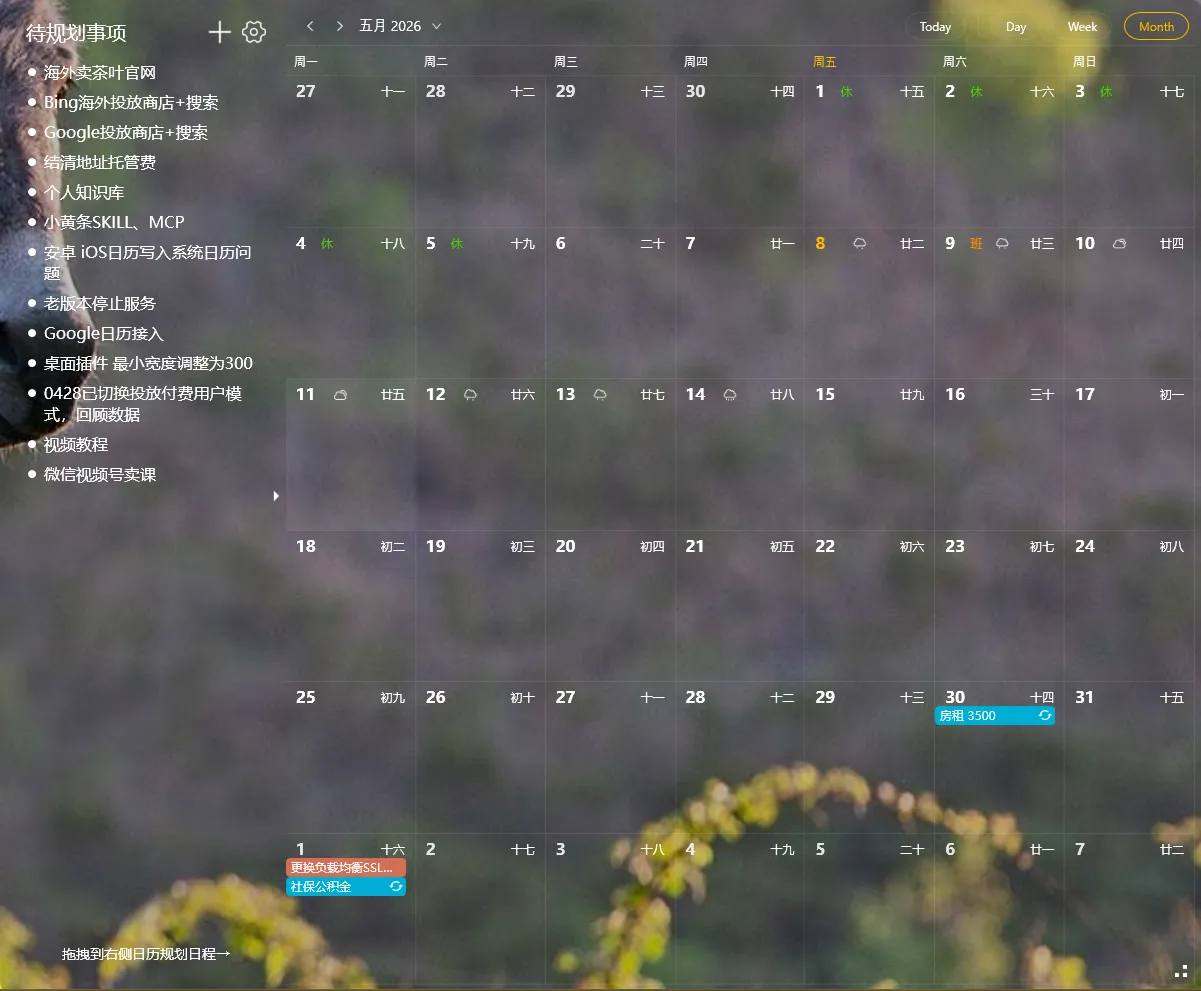
Calendar manages time, sticky notes manage content — this is the ideal combination of desktop calendar and sticky notes.
Many people use only a calendar (recorded times but no details) or only sticky notes (recorded details but no scheduling). Using them together maximizes productivity.
Why Combine Desktop Calendar with Sticky Notes
Section titled “Why Combine Desktop Calendar with Sticky Notes”Calendars are great at answering “when to do what,” but calendar input fields are usually too small for detailed content. Sticky notes excel at recording detailed information but have no timeline for scheduling.
YYNote supports both desktop calendar and transparent sticky notes in the same widget — switch between them with one click from the top-left corner.
Three Ways to Use Them Together
Section titled “Three Ways to Use Them Together”Mode 1: Calendar for timing, sticky notes for details
Mark “3PM Client Meeting” on the desktop calendar. Write meeting discussion points and pending questions on sticky notes. Check the calendar for timing, look at sticky notes during the meeting.
Mode 2: Sticky notes as inbox, calendar as scheduler
When ideas strike or tasks come in, jot them on sticky notes first (collection phase). Spend 5 minutes each morning and evening organizing — drag time-specific items onto the calendar (scheduling phase).
Mode 3: Calendar for overview, sticky notes for daily focus
Open the desktop calendar to see your weekly schedule. Switch to sticky note mode — only today’s main tasks show. One tool, two views, no app switching.
Who Benefits Most
Section titled “Who Benefits Most”Office workers: Sticky notes for meeting points and todos, calendar for meeting times and deadlines. A full day’s plan at a glance.
Students: Sticky notes for course notes and assignment requirements, calendar for exam dates and submission deadlines.
Freelancers: Sticky notes to track multiple projects, calendar to schedule focus blocks for each project.
YYNote’s Desktop Calendar and Sticky Note Features
Section titled “YYNote’s Desktop Calendar and Sticky Note Features”YYNote’s desktop calendar supports lunar dates, recurring events, countdowns, and weather display — features rarely found in basic desktop calendar tools.
The transparent sticky notes support rich text (line breaks, color marks, font adjustments), tag classification, and multi-list management.
Both modes are in the same desktop widget — no separate windows needed.
Start Using Them Together
Section titled “Start Using Them Together”After downloading YYNote, the desktop widget defaults to todo mode. Click the top-left corner to switch to “Schedule mode” for the desktop calendar. Switch back to “Sticky Note mode” for memos.
Both modes share the same data source: calendar items and sticky note todos are essentially the same data shown differently.