
How to Put Todos on Your Desktop? YYNote Makes Tasks Always Visible
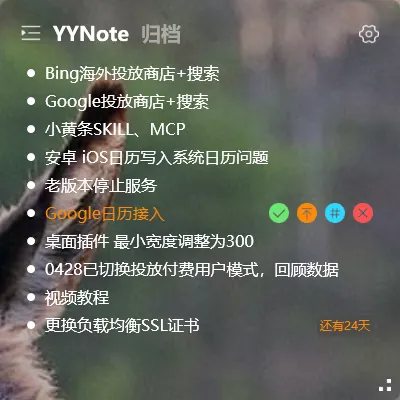
Have you ever opened your computer to start work, only to struggle finding yesterday’s todo list? Or saved tasks in some app, but have to open it every time just to see them?
There’s a simpler way — put your todos directly on the desktop.
What is a Desktop Todo
Section titled “What is a Desktop Todo”A desktop todo means displaying your task list as a widget directly on the Windows desktop. No need to open any app — the todo list is right there, transparent, not blocking your work, always visible.
YYNote Desktop Todo Highlights
Section titled “YYNote Desktop Todo Highlights”Transparent Display, No Blocking
YYNote’s desktop widgets support fully transparent backgrounds. The todo list floats on the desktop without blocking wallpaper or windows below. Glance at it when needed; it sits quietly when not, causing zero distraction.
No App to Open, Direct Interaction
Click on a desktop todo to create, check off, or adjust timing — all frequent operations can be done on the widget itself without entering the main interface.
Smart Recognition, One-Phrase Creation
Type “Call the client tomorrow at 9 AM” in the todo input box, and the system automatically recognizes the task and reminder time — no manual setup needed.
Auto Sync Across Devices
Change a todo on desktop, and it’s immediately visible on your phone. Jot one down at work on your computer, and it’s already there when you open your home PC.
Who It’s For
Section titled “Who It’s For”- Professionals who often miss tasks due to poor tracking
- Project managers who need constant visibility of task lists
- Anyone who wants to see today’s tasks the moment they start working
Final Thoughts
Section titled “Final Thoughts”No flashy new features, just continuous refinement. YYNote’s only goal is to make “seeing your tasks” as simple as possible.