
Best Desktop Sticky Note Software for Windows: Which to Choose?
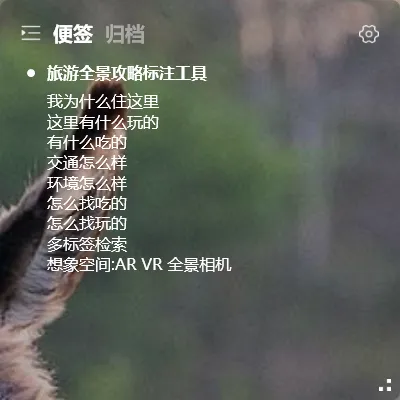
There are many desktop sticky note apps for Windows — from built-in system tools to various third-party options. Which one should you pick?
Start with what you actually need:
- Just jot down a few notes on your desktop → System sticky notes is enough
- Need to sync across multiple devices → Look for cloud-synced software
- Frequently reinstall your system → You need cloud data backup
Desktop Sticky Note Software Comparison
Section titled “Desktop Sticky Note Software Comparison”| Software | Transparent Desktop | Multi-device Sync | Tag Management | Resource Usage | Price |
|---|---|---|---|---|---|
| System Sticky Notes | ❌ Yellow background | ❌ Local only | ❌ | Very low | Free |
| YYNote | ✅ Fully transparent | ✅ Win/Android/iOS/HarmonyOS | ✅ Tags + Lists | Low (~50MB) | Subscription |
| Other sticky note apps | ❌ Non-transparent | ✅ Some | ✅ Some | Medium-High | Subscription |
If you just need quick notes, system sticky notes works fine. But if you want transparent desktop embedding, cross-device sync, and tag management, YYNote is the lightest option available.
What Makes YYNote Different
Section titled “What Makes YYNote Different”Most desktop sticky note apps are just “pinned windows” — an app window fixed to the bottom of your screen.
YYNote works differently. It’s truly transparent and embedded in your wallpaper — the sticky note widget is completely transparent, showing only text content. The background blends with your wallpaper. No window borders, no taskbar clutter, no distraction.
The transparent widget looks much closer to a real sticky note than a regular “always-on-top” window. Many people see the screenshot and think it’s written directly on the wallpaper.
What to Look for in Sticky Note Software
Section titled “What to Look for in Sticky Note Software”Don’t just compare feature lists — consider how often you’ll use it.
If you sit at a computer for 8 hours a day, your sticky note tool is something you interact with constantly. A lightweight, stable, non-intrusive tool is more valuable than a feature-heavy, bloated one.
YYNote’s philosophy: Always visible at startup, never intrusive, write whenever you need to. No popups, no notification badges, no ads. Just a transparent sticky note on your wallpaper.
How to Get Started
Section titled “How to Get Started”- Download YYNote (Windows / Android / iOS / HarmonyOS)
- Create an account — 7-day free trial
- Right-click the system tray icon → Settings → App Settings → Enable desktop sticky note list
- A transparent sticky note appears on your desktop — start writing
All features are available during the 7-day free trial, including sync, tags, and desktop widgets.
For more sticky note tips, check the sticky note usage guide.