
Desktop Tag Management: Organize Your Sticky Notes with Tags
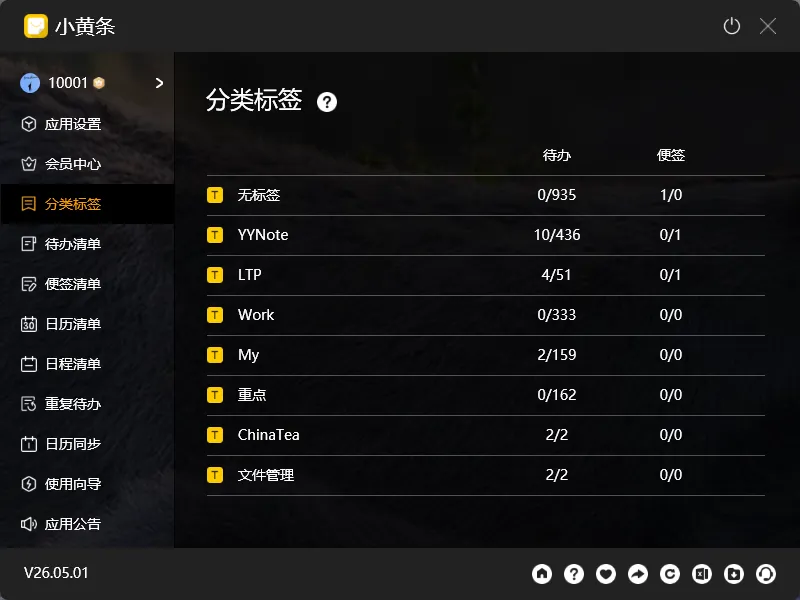
Once you have more than a few dozen sticky notes and todos on your desktop, finding the one you need becomes a real challenge.
Scrolling through 20-30 items is manageable by eye. But at 50, 60, or 100+ items, you need a proper organizational system.
That’s where desktop tag management comes in.
Tags vs Folders
Section titled “Tags vs Folders”Traditional folder management has one limitation: an item can only live in one folder. If a task belongs to both “Project A” and “Urgent This Week,” you can only put it in one folder — or duplicate it (which is worse).
Tags are different. One item can have multiple tags. Search by any tag to find what you need.
YYNote’s desktop tag system works exactly this way:
- One todo can have both #projectA and #urgent tags
- One sticky note can have both #meetingNotes and #ideas tags
- Filter by #urgent — all urgent items show up
- Filter by #projectA — all project A items in one view
Practical Tag Uses
Section titled “Practical Tag Uses”By project. Running three projects simultaneously? Tag each todo with its project. #projectA, #projectB, #projectC — switch tags to switch project views on your desktop.
By scenario. #office, #home, #onTheGo — filter by tags to see only what’s relevant to your current location.
By type. #phoneCalls, #meetings, #readingList, #shopping — type-based tags work across different projects.
Auto-tagging. YYNote supports automatic tag rules. Create a new note containing “meeting” and it’s automatically tagged #meeting — no manual work needed.
Multi-Tag Filtering
Section titled “Multi-Tag Filtering”YYNote supports selecting multiple tags for combined filtering. Select both #thisWeek and #work — your desktop shows only this week’s work items.
Filter results update the desktop widget in real time — no manual refresh needed.
Three Principles for Tag Management
Section titled “Three Principles for Tag Management”-
Don’t use too many tags. 5-8 core tags are enough. Too many choices make tagging harder than it should be.
-
Make tags distinct. #work and #personal shouldn’t overlap.
-
Clean up regularly. Completed project tags can be deleted. Archive old content instead of letting tags accumulate.
Desktop tag management turns your desktop from “a board covered in sticky notes” into “a smart panel you can reorganize at will.”