
Desktop Sticky Note Widget: Digital Post-its That Never Fall Off
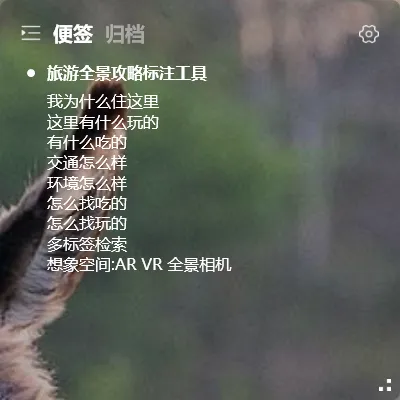
Paper sticky notes have problems. Buy a pack of five colors, and within three days they’re all curled up or falling off. Stick one on your phone case? It falls off in your pocket. Put one on your monitor bezel? After a while you stop noticing it.
Desktop sticky notes are the digital version — but they never fall off, never get crumpled, and never get ruined in the wash.
What Are Desktop Sticky Notes
Section titled “What Are Desktop Sticky Notes”Move your sticky notes onto your computer screen. Write a line of text, and it stays on your desktop. No matter how many windows you open, switch back to your desktop and it’s there.
YYNote’s sticky notes plugin does exactly this. Open it, and a transparent “sticky note” appears on your desktop. Type on it, and the content stays there. Change your wallpaper? No problem. Restart your computer? Still there.
How They Compare to Real Sticky Notes
Section titled “How They Compare to Real Sticky Notes”| Feature | Paper Sticky Notes | Desktop Sticky Notes |
|---|---|---|
| Stay in place | Start peeling after 2 days | Never fall off |
| How much you can write | A few words per note | Unlimited text, paragraphs |
| Organize | Different colors | Tags + multiple lists |
| Move around | Peel and re-stick | Just drag |
| Multiple devices | Physical location only | Syncs across devices |
| Search | Look everywhere | Tag filter, keyword search |
Paper notes still have their place — stick one on a coworker’s desk during a meeting, or leave one on your fridge. But for daily memos, ideas, and temporary to-dos, desktop sticky notes are more reliable.
Common Uses
Section titled “Common Uses”Quick reminders: Pick up a package, water the plants, clock out — see it on your desktop, do it, delete it.
Meeting notes: Jot down key points during a discussion, export them later.
Catch ideas: A sudden idea strikes? Desktop sticky notes capture it in one second.
Built Into Your Wallpaper, Not Stuck On Top
Section titled “Built Into Your Wallpaper, Not Stuck On Top”Unlike the system Sticky Notes app — YYNote’s sticky notes are transparently embedded into your wallpaper. They look like they’re written directly on your background image.
When you’re working, they sit quietly on the wallpaper, not blocking anything. When you need to check them, glance at the corner of your screen.
Windows and Android support transparent floating widgets. iOS doesn’t support transparency yet, but the app experience is identical and data syncs in real-time.
You’re Probably Already Using Something Similar
Section titled “You’re Probably Already Using Something Similar”Many people use Windows Sticky Notes as their go-to note tool. But the built-in version has limitations:
- No cross-device sync (reinstall your system and they’re gone)
- No organization (just individual yellow notes)
- No tag system (hunting through old notes takes forever)
If you’re already using system sticky notes, YYNote is a natural upgrade — same simplicity, plus sync, tags, and list management.