
Desktop Sticky Notes: A Digital Post-it That Sticks to Your Screen
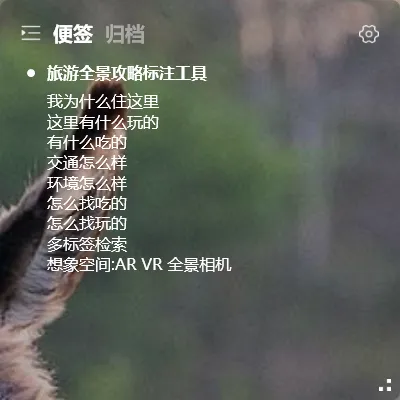
Real sticky notes are great. Tear one off, scribble a reminder, stick it to the edge of your monitor. Two days later it falls off. Or you’ve got 15 of them framing your screen like yellow wallpaper.
Desktop sticky note apps promise to fix this: digital Post-its that stay put, stay organized, and sync to your phone.
What a Desktop Sticky Note Should Feel Like
Section titled “What a Desktop Sticky Note Should Feel Like”A good desktop sticky note should feel like the real thing:
- Lives on your desktop, not hidden in the system tray — visible the moment you boot up, no app to open
- Doesn’t block your wallpaper — no white rectangle covering your carefully chosen background
- Quick to write on — just like a physical Post-it: think it, write it, done
Most desktop sticky note tools are just “a window pinned to the desktop.” Real sticky note UX is transparent — you only see the text, never the tool.
YYNote: The Closest Thing to a Real Post-it on Your Screen
Section titled “YYNote: The Closest Thing to a Real Post-it on Your Screen”YYNote’s desktop widget is transparently embedded in your wallpaper. Your notes float as text only — no borders, no backgrounds, no UI chrome. It looks exactly like a Post-it stuck to your screen, minus the curling edges.
This isn’t a floating window. It’s a transparent overlay built into your desktop.
Better Than Real Sticky Notes
Section titled “Better Than Real Sticky Notes”| Real Post-it Notes | YYNote Desktop Sticky Notes |
|---|---|
| Too many = messy | Tags and categories, switch on demand |
| Fall off, get dirty | Always clean, never falls |
| One computer only | Syncs across Win/Android/iOS/HarmonyOS |
| Handwriting only | Editable text, searchable |
| No reminders | Combine with todos for alerts |
More Than Just Sticky Notes
Section titled “More Than Just Sticky Notes”The YYNote desktop widget switches between four lists with one click:
- Sticky Notes — your digital Post-its
- Todo List — things to get done, cross them off
- Schedule — today and tomorrow at a glance
- Countdown — days until the next holiday
One widget, four modes. One click to switch.
YYNote vs Other Options
Section titled “YYNote vs Other Options”| Tool | Type | Transparent | Cross-device | Price |
|---|---|---|---|---|
| System Sticky Notes | Built-in | ❌ Yellow floating window | ❌ | Free |
| YYNote | Transparent widget | ✅ | ✅ | $28/year |
| Other desktop sticky notes | Various | ❌ Colored boxes | ✅ Some | Subscription |
How to Use Desktop Sticky Notes Effectively
Section titled “How to Use Desktop Sticky Notes Effectively”- Quick-reference info: Wi-Fi passwords, project links, work accounts
- Fleeting ideas: keywords from meetings, sudden thoughts
- Today’s priorities front and center, everything else tagged and categorized
Don’t over-organize. The point of desktop sticky notes is “write it fast, see it always.”
Get Started
Section titled “Get Started”- Download YYNote
- Sign up, free 7-day trial
- Right-click tray icon → Settings → App Settings → Enable Sticky Notes list
- Transparent widget appears on your desktop — start writing
Not your thing? 7-day no-questions refund.