
YYNote vs System Sticky Notes: Which Desktop Notes Tool Is Better?
System sticky notes is the first desktop note tool many people use. Open it, type, and it sticks to your screen. No account needed, no setup required.
So do you really need a third-party app? It depends on how you use sticky notes.
YYNote’s Key Features
Section titled “YYNote’s Key Features”Transparent Desktop Integration
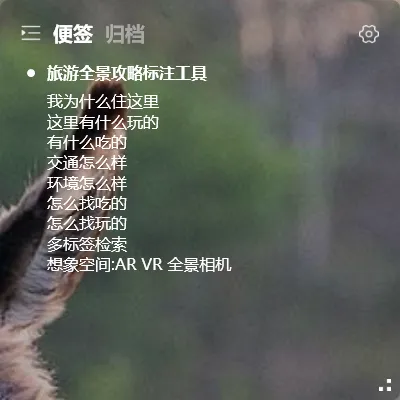
YYNote’s sticky notes aren’t floating windows — they’re text embedded directly into your wallpaper. Fully transparent, never blocks your background, and no matter how many notes you have, you only see the text.
Multi-Device Sync
System sticky notes are stored locally — reinstall Windows and they’re gone. YYNote syncs everything to the cloud. Log in on a new device, and all your notes are there.
Tag Organization
Too many notes to find what you need? YYNote supports tag filtering. Click #meeting and all meeting-related notes appear instantly.
Privacy Hide
One-key shortcut to hide all notes — no need to worry about others seeing your private content.
Calendar Sync
Notes and calendar can be linked. Related schedules display directly alongside your notes.
Mobile Access
System sticky notes have no mobile app. YYNote has Android/iOS/HarmonyOS apps — write on your computer, see it on your phone.
Quick Feature Comparison
Section titled “Quick Feature Comparison”| Feature | System Sticky Notes | YYNote |
|---|---|---|
| Startup speed | Fast | Fast |
| Transparent background | ❌ Yellow cards | ✅ Fully transparent, embedded in wallpaper |
| Multi-device sync | ❌ Local only | ✅ Win/Android/iOS/HarmonyOS |
| Data migration | ❌ Lost on reinstall | ✅ Cloud sync |
| Tag organization | ❌ Not supported | ✅ Multi-tags + multiple lists |
| Privacy hide | ❌ Not supported | ✅ One-key shortcut |
| Mobile access | ❌ | ✅ View and edit on phone |
When to Keep Using System Sticky Notes
Section titled “When to Keep Using System Sticky Notes”Your note-taking is simple: just a few reminders on your current computer, no need to switch devices, no worry about data loss. System sticky notes is perfectly adequate. Open and write — one less step than third-party apps that require an account.
When to Switch to YYNote
Section titled “When to Switch to YYNote”Notes disappear after reinstalling Windows — Sticky Notes data is local. YYNote stores everything in the cloud. Login on a new computer, and all your notes are back.
Want to see notes on your phone — System sticky notes don’t have a mobile app. YYNote has Android/iOS/HarmonyOS apps. Write on your computer, see it on your phone.
Too many notes to find what you need — System sticky notes show them one by one. YYNote supports tag filtering. Click a tag and all related notes appear instantly.
Want a cleaner desktop — System sticky notes are yellow floating cards. Stack enough of them and your desktop looks messy. YYNote is transparently embedded in your wallpaper — no matter how many notes you have, only the text is visible.
You Can Use Both
Section titled “You Can Use Both”Switching doesn’t mean moving everything at once:
- Start putting new content in YYNote
- Cross off items in system sticky notes as you complete them
- Once system sticky notes is empty, you’re done
Or use both simultaneously — system sticky notes for temporary content, YYNote for long-term notes that need syncing.
YYNote offers a 7-day free trial with all features. Try it and see if it works for you.