
Minimalist Desktop Weather & Time Widget for Windows: Top Picks
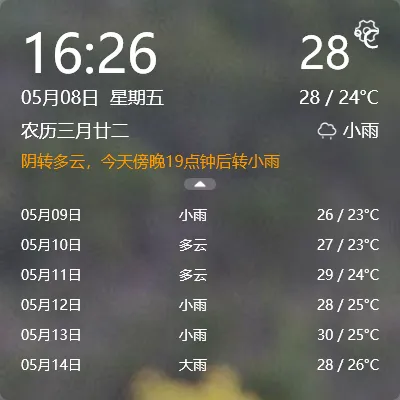
“Minimalist time and weather” — if you’ve searched for this, you’re probably looking for a single small widget that shows both the clock and the weather, sits quietly in the corner of your desktop, and doesn’t get in the way.
Here’s a look at three Windows desktop weather-and-time tools, from the super-minimal to the data-rich. Pick the one that fits your style.
The three options at a glance
Section titled “The three options at a glance”| Tool | YYNote | WeatherMate | Desktop Weather |
|---|---|---|---|
| Shows time | Yes | No | No |
| Shows weather | Yes (temp, conditions, 7-day forecast, alerts) | Yes (icon, temp, forecast) | Yes (temp, humidity, wind, pressure) |
| Transparent | Yes, blends into wallpaper | No | No |
| Draggable | Yes | No | Yes |
| Data source | Auto-detect via system location | Manual city selection | Manual city selection |
| Free | 7-day trial → paid | Free | Free |
1. YYNote — time and weather in one transparent panel
Section titled “1. YYNote — time and weather in one transparent panel”YYNote isn’t a dedicated weather tool — it’s a desktop widget system that includes weather alongside time, calendar, and to-do. The weather-time panel is just one piece.
What makes it different: transparency. The time and weather text floats directly on your wallpaper. No box, no border, no window frame. It looks like the text was written on your wallpaper.
Ideal if: you want to glance at the time, date, and today’s weather without opening anything. One panel covers all three.
2. WeatherMate — weather only, no time
Section titled “2. WeatherMate — weather only, no time”WeatherMate sits in your system tray. Click for details, hover for a quick look. It’s lightweight and free.
The trade-off: no clock, no date. You’ll still need to glance at the taskbar for the time. If you specifically want time and weather together, WeatherMate only solves half the problem.
3. Desktop Weather — more data, more visual weight
Section titled “3. Desktop Weather — more data, more visual weight”Desktop Weather gives you temperature, humidity, wind speed, wind direction, and barometric pressure. If you want the full meteorological picture, this is your tool.
The downside: it’s a larger window that looks more like a dashboard than a subtle widget. For the “quick glance before heading out” use case, it might feel like too much information.
How to choose
Section titled “How to choose”- Just need weather, don’t want to pay → WeatherMate
- Want full weather data with all the details → Desktop Weather
- Want time, date, and weather in one transparent, wallpaper-blended panel → YYNote
Final thought
Section titled “Final thought”The whole point of a desktop weather widget is simple: glance up, see the time and weather, move on. All three tools deliver that in different ways. Pick the one you enjoy looking at.