
Todoist vs YYNote: Which Desktop To-Do App Fits Your Workflow
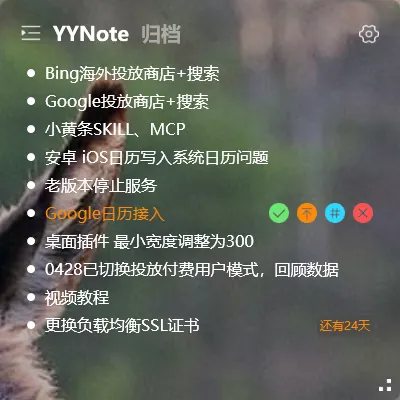
Todoist is one of the world’s most popular to-do apps. YYNote takes a different approach — desktop-widget-first. If you’re choosing between them, here’s the breakdown.
The fundamental difference: lists vs desktop
Section titled “The fundamental difference: lists vs desktop”Todoist is built around lists. Every task lives in a list — Today, Next 7 Days, Projects, Labels. You open Todoist to manage your tasks.
YYNote is built around the desktop. Your tasks live directly on your desktop wallpaper as a transparent widget. You don’t open anything — they’re just there when you look at your screen.
This difference shapes the entire experience:
| Dimension | Todoist | YYNote |
|---|---|---|
| Task visibility | Requires opening app or web | Always visible on desktop |
| Task organization | Projects, labels, filters | Lists, labels, pinning |
| Natural language input | Yes (“tomorrow 3pm meeting”) | Manual date setting |
| Collaboration | Team sharing supported | Personal tool |
| Desktop experience | App window or browser | Transparent desktop widget |
| Extra features | Pure to-do | To-do + notes + calendar + weather + countdown |
| Platforms | Web/Win/Mac/iOS/Android | Win/Android/iOS/HarmonyOS |
| Free tier | Basic free | 7-day trial → paid |
Where Todoist shines
Section titled “Where Todoist shines”Natural language input. Type “submit report tomorrow 5pm” and Todoist parses the date and time automatically. This is its killer feature.
Project management depth. Projects, sub-tasks, sections, labels, filters — built for managing complex multi-project workflows.
Team collaboration. Assign tasks, share projects. Built for teams.
Platform reach. Works in a browser — no install required.
Where YYNote shines
Section titled “Where YYNote shines”Always-visible desktop widgets. This is the biggest difference. Todoist can be powerful, but you have to remember to open it. YYNote is always there — visually impossible to ignore. For people who forget to check their to-do app, this is a game-changer.
Natural desktop interaction. Click empty space on your desktop to create a task. Feels like writing on a sticky note. No Alt-Tabbing required.
Multi-info desktop view. To-dos, calendar, weather, and countdown visible simultaneously. Todoist requires switching views to see your calendar.
Built-in sticky notes. Todoist doesn’t have a notes feature. YYNote has a separate notes list for quick captures that aren’t tasks.
Which one to pick
Section titled “Which one to pick”If you manage complex multi-project workflows or need team collaboration → Todoist’s project management and natural language input are hard to beat.
If you work at a computer all day and want your tasks always visible on your desktop, with quick capture and multi-info dashboard → YYNote’s desktop experience is more direct.
Final thought
Section titled “Final thought”Todoist and YYNote represent two philosophies of task management: one treats to-dos as projects to manage, the other treats them as sticky notes on your desk. Neither is wrong — it depends on whether you’re a manager or a doer.