
Memo Software for Windows: Best Desktop Memo App Recommendation
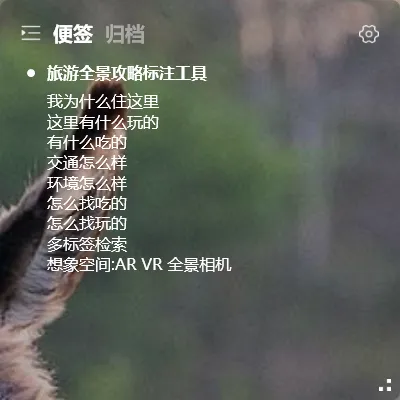
Windows has a built-in memo tool (Sticky Notes), and it works fine for basic use. But if you need to sync between devices, want memos embedded on your wallpaper, or need both memos and todos in one place — it’s time for a better desktop memo app.
Desktop Memo vs Phone Memo
Section titled “Desktop Memo vs Phone Memo”Phone memos are portable — you can write anywhere. But the downside: you have to unlock your phone to see them, and it’s easy to get distracted.
Desktop memo software lives on your PC screen. Visible at startup. No unlocking, no app switching — switch to your desktop and your memos are there.
YYNote belongs to this second category, and it’s one of the few transparent desktop memo apps available.
Why YYNote Is the Best Memo Software for Windows
Section titled “Why YYNote Is the Best Memo Software for Windows”Transparent on wallpaper. YYNote’s memo area is semi-transparent or fully transparent. Text floats directly on your wallpaper, looking like part of the background. No yellow cards cluttering your screen.
Memos + todos in one. Most memo software only handles text. YYNote supports both sticky note mode (pure recording) and todo mode (checklist tasks). Same interface, two uses.
Cross-device sync. Windows, Android, iOS, HarmonyOS — all covered. Write a memo at home, see it on your work computer automatically. Change computers? No data loss.
Tag-based organization. Found your memos piling up? Tags solve that. #work, #personal, #project — filter by tag and find anything in seconds.
Recommendation by Scenario
Section titled “Recommendation by Scenario”| Scenario | Recommended Choice |
|---|---|
| Only use at the office | Windows Sticky Notes is enough |
| Need home + office sync | YYNote |
| Need phone + computer access | YYNote |
| Want calendar integration | YYNote |
| Pure text recording only | Any memo app works |
How to Start
Section titled “How to Start”YYNote offers a 7-day full-feature free trial. Download the Windows client and a transparent memo area appears on your desktop. Click to start writing. Register an account and cloud sync kicks in automatically.
The best desktop memo app is the one you actually use. YYNote makes sure you see your memos — because they’re right on your desktop.