
How to Choose a Desktop Todo List Widget: 5 Key Dimensions
Searching for the right desktop todo list widget can be overwhelming. Dozens of tools claim to be the “best,” each with a different account system and pricing structure. Most reviews read like sponsored lists.
Here’s a different approach: a decision framework that works for any tool, not a single recommendation. Spend five minutes reading this and you’ll know which tool fits your workflow.
Two fundamental interaction models
Section titled “Two fundamental interaction models”Before evaluating features, you need to know the difference between two completely different ways a todo tool can show up on your desktop:
Window-based model. Open a separate window to see and edit your tasks. The task list disappears when you close the window. This is the default for most tools, including those from major productivity suites.
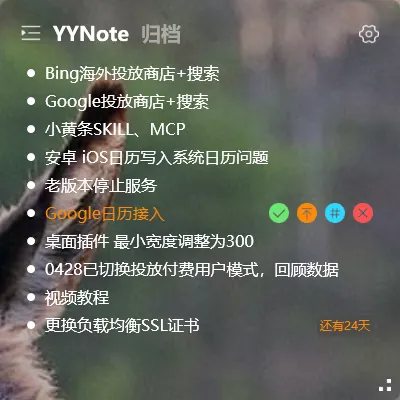
Desktop-overlay model. The task list lives directly on your wallpaper as a transparent widget. Visible the moment you turn on your computer, no opening required. Editing happens by clicking through the widget itself.
These two models are fundamentally different — choosing between them is the first decision. If you already have a “main workspace” and want your tasks always in sight, the desktop-overlay model fits. If you prefer deep task management features and don’t mind opening a window, the window-based model works.
Five dimensions to evaluate any tool
Section titled “Five dimensions to evaluate any tool”1. Transparency and visual weight
Section titled “1. Transparency and visual weight”Does the widget sit transparently on your wallpaper, or does it have a fixed window frame that blocks part of the background? On a 4K wallpaper, a solid-frame window feels heavy and intrusive. A transparent widget feels like part of the desktop.
What to look for:
- Adjustable opacity
- No fixed borders or always-visible title bars
- Text floats directly on background
2. Free feature limits and pricing
Section titled “2. Free feature limits and pricing”“Free” is rarely free. Check three things:
- Trial duration: 7 days? 14 days? 30 days?
- Feature gating in trial: Can you use all features during trial, or are some locked until you pay?
- Long-term cost: Annual subscription? One-time purchase? Free forever but with limited features?
A 7-day trial of all features is a useful model — long enough to know if it works, short enough to keep vendors honest.
3. Memory usage
Section titled “3. Memory usage”Background tools eat RAM. A todo widget that uses 200MB will slow down an older laptop. Look for tools under 50MB idle — anything lighter is feasible to leave running 24/7.
4. Multi-device sync
Section titled “4. Multi-device sync”If you have a phone and a computer, your tasks need to be on both. Check:
- Which platforms are supported (Windows / Mac / iOS / Android / HarmonyOS / Linux)
- Whether sync is real-time or manual
- Whether you need a separate account per device, or one account syncs everywhere
5. Interaction model
Section titled “5. Interaction model”How do you add a task?
- Click the widget and type — fastest, especially for quick capture
- Open the main window and click ”+” — more steps, but more features
- Right-click context menu — only for power users
The fastest capture path wins for daily use. A tool that takes 3 seconds to add a task will be used 5x more than one that takes 15 seconds.
What to do after reading this
Section titled “What to do after reading this”Pick the dimension that matters most to you. For most people, the interaction model is the deal-breaker — if a tool requires opening a window every time, you stop using it within a week.
Try two or three tools using their free trial. Set up the same task list in each. After a week, you’ll know which one you actually reach for. Don’t pick based on feature lists; pick based on which one you keep coming back to.
If you want a tool that:
- Sits transparently on your desktop (no separate window)
- Has a 7-day trial of all features, no credit card upfront
- Syncs across Windows, Android, iOS, HarmonyOS
- Uses less than 50MB of memory idle
- Adds tasks in one click
→ Download YYNote — but only if the dimensions above match your priorities. If they don’t, the other tools on the market will serve you better.