
Desktop Sticky Note Gadget: Transparent Notes for Windows
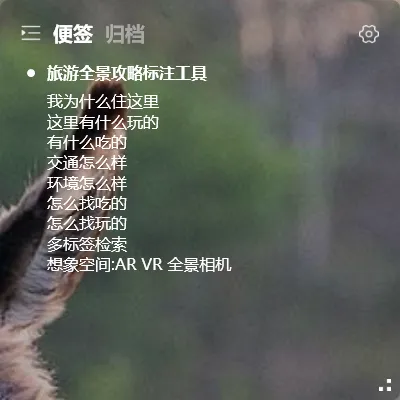
A desktop sticky note gadget is exactly what it sounds like: a digital sticky note that lives on your computer screen, always visible on your wallpaper.
A good desktop sticky note gadget needs to meet three criteria:
- Lightweight — shouldn’t slow down your computer
- Always visible — no need to open an app to see your notes
- Data stays safe — notes don’t disappear when you reinstall your system
How Lightweight Is YYNote’s Sticky Note Gadget
Section titled “How Lightweight Is YYNote’s Sticky Note Gadget”YYNote’s entire app is under 50MB. The desktop sticky note widget is one module — once enabled, it uses minimal resources.
- Shut down and restart? Notes are still there
- Change your wallpaper? Notes stay put
- Full-screen gaming? The transparent notes sit on your wallpaper with zero impact on frame rate
Compared to some Electron-based note apps that eat hundreds of MB of RAM, YYNote is very resource-efficient on Windows.
Four Desktop Gadgets, One Plugin
Section titled “Four Desktop Gadgets, One Plugin”YYNote’s desktop widget switches between four modes from the top-left corner:
Sticky Notes — The lightest text tool. No reminders, no deadlines. Just write.
Todo List — Checkbox-style task list. Check it off when done, auto-archive.
Schedule List — Time-based event list. Sorted chronologically, cross off when done.
Countdown — Shows days until a target date, plus the next 3 holidays.
One desktop widget, four gadgets, one click to switch.
YYNote vs System Sticky Notes
Section titled “YYNote vs System Sticky Notes”| Feature | System Sticky Notes | YYNote Desktop Widget |
|---|---|---|
| Startup speed | Fast | Fast |
| Resource usage | Low | Low |
| Transparent background | ❌ Yellow background | ✅ Fully transparent |
| Cross-device sync | ❌ Windows only | ✅ Windows/Android/iOS/HarmonyOS |
| Tag management | ❌ Not supported | ✅ Tag filtering |
| Multiple lists | ❌ Single notes only | ✅ Multiple lists |
| Privacy hide | ❌ Not supported | ✅ One-key shortcut |
| Backup & recovery | Lost on reinstall | ✅ Cloud sync |
This desktop sticky note gadget is ideal for anyone who wants their notes always visible without cluttering the screen. If system sticky notes works for you, keep using it. But if you’ve ever lost notes during a reinstall, needed to access them from your phone, or had too many notes to find what you need — YYNote is a solid upgrade.
How to Get Started
Section titled “How to Get Started”- Download YYNote — available for Windows, Android, iOS, and HarmonyOS
- Create an account
- Right-click the system tray icon → Settings → App Settings → Enable desktop sticky note list
- A transparent sticky note appears on your desktop — start writing
7-day free trial — try all features. Pay only if it works for you.
For more sticky note tips, check the sticky note usage guide.