
How to Create a To-Do List on Your Desktop - YYNote Transparent Widget
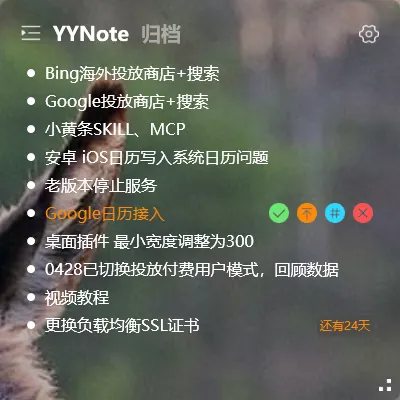
Ever found yourself switching between apps just to check what you need to do today? You jot down tasks in one app, reminders in another, and somehow still miss things.
The solution is simple: put your to-do list directly on your computer desktop. When tasks are always in sight, you never forget them.
How to Create a To-Do List on Your Desktop
Section titled “How to Create a To-Do List on Your Desktop”YYNote turns your desktop wallpaper into a living task board. Here’s how to set it up:
1. Download and Install
Section titled “1. Download and Install”Download YYNote for Windows and complete the registration. The full setup takes under a minute.
2. Add the Desktop Todo Widget
Section titled “2. Add the Desktop Todo Widget”Right-click the YYNote tray icon → Settings → App Settings → Set the “Desktop Todo List” quantity to 1. The widget instantly appears on your desktop as a transparent floating list.
3. Start Adding Tasks
Section titled “3. Start Adding Tasks”Click anywhere on the todo widget to create a task. YYNote supports smart recognition — type “Call client tomorrow at 9 AM” and it automatically sets the reminder. No manual date picking needed.
Why Put Your To-Do List on the Desktop
Section titled “Why Put Your To-Do List on the Desktop”Always Visible, Zero Effort
Section titled “Always Visible, Zero Effort”Every time you look at your screen, your tasks are there. No unlocking your phone, no opening an app — your todo list sits right on your wallpaper, always at a glance.
Transparent and Non-Intrusive
Section titled “Transparent and Non-Intrusive”YYNote’s widget has a transparent background that blends into your wallpaper. It doesn’t block your work but is always there when you need it.
Drag to Schedule
Section titled “Drag to Schedule”Need to plan when to do a task? Drag a todo item directly onto the desktop calendar to set start and end times. It converts instantly from a task to a scheduled event.
Sync Across Devices
Section titled “Sync Across Devices”Add a task on your work computer and it shows up on your home PC and phone. Everything stays in sync automatically.
Who Needs a Desktop To-Do List
Section titled “Who Needs a Desktop To-Do List”- Professionals who juggle multiple projects and need constant task visibility
- Remote workers who want their daily plan visible the moment they start their computer
- Anyone who’s tired of forgetting tasks buried inside apps
Final Thoughts
Section titled “Final Thoughts”No flashy new features, just continuous refinement. YYNote’s only goal is to make your tasks visible on your desktop so you see them clearly and get things done.