
How to Choose a Desktop Calendar Widget for Windows: 3 Approaches
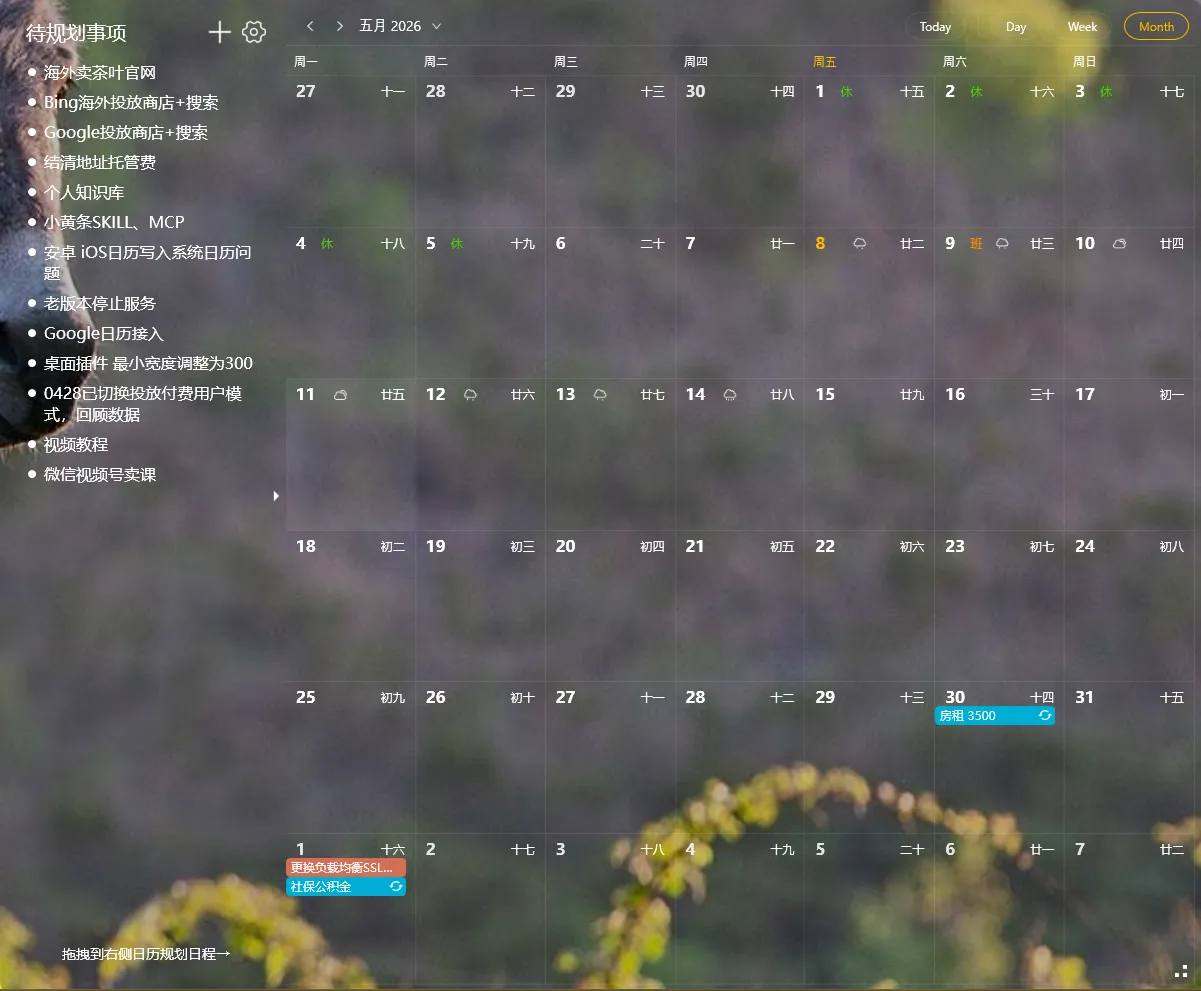
If you’re searching for a “desktop calendar for Windows,” you probably want one thing: to see the month at a glance without opening a browser or pulling out your phone.
Most searches lead to lists comparing a handful of apps. That’s not useful — every list is biased. Here’s a different approach: three categories of tools, with the trade-offs of each, and a decision framework for picking one.
Three ways to get a desktop calendar
Section titled “Three ways to get a desktop calendar”1. Standalone calendar apps
Section titled “1. Standalone calendar apps”Full-featured applications: Outlook, Thunderbird, dedicated calendar programs. Pros: full event management, multiple calendar accounts, reminders, sharing. Cons: lives in a window you have to open. Not always visible.
Best for: People who manage complex schedules and need full event creation/editing in one place.
2. The built-in Windows calendar
Section titled “2. The built-in Windows calendar”Click the time/date in your taskbar, and a small mini-calendar pops up. Click “show full calendar” for a larger view. Pros: zero installation. Cons: requires a click to see, no widget mode, easy to forget it exists.
Best for: People who check the date occasionally and don’t need it always visible.
3. Desktop widget calendars
Section titled “3. Desktop widget calendars”A calendar that lives directly on your desktop wallpaper, visible at all times. Some are transparent overlays; some have fixed frames. Pros: always visible, often shows additional info (holidays, lunar calendar, weather). Cons: limited event creation compared to standalone apps.
Best for: People who want the date and upcoming schedule visible at a glance, with a quick view of what’s next.
Four dimensions to evaluate
Section titled “Four dimensions to evaluate”Visibility
Section titled “Visibility”Can you see the calendar without clicking anything? If you have to click, it’s not really a “desktop calendar” — it’s a calendar app. Widget-based options win this dimension.
Holiday and schedule awareness
Section titled “Holiday and schedule awareness”A blank month grid is useful, but knowing “next Monday is a holiday” is even more useful. Look for tools that show:
- Public holiday markers
- Day-off and shift-work indicators
- Lunar calendar (for East Asian users)
- Event overlay from external calendars (Google, Outlook, Exchange)
Event creation friction
Section titled “Event creation friction”How do you add a new event? Three patterns:
- Click date → type title (fastest)
- Click ”+” → form with multiple fields (more steps, more detail)
- External app sync (create in Outlook/Google, widget shows it; least friction for daily use)
Resource usage
Section titled “Resource usage”A widget that uses 200MB of RAM will slow down an older laptop. Look for under 50MB idle.
Which approach fits you
Section titled “Which approach fits you”- If you live inside Outlook or Google Calendar: option 1 (standalone) — your existing system is already where events live
- If you only need to check dates occasionally: option 2 (built-in) — zero install, zero RAM
- If you want the calendar always visible without thinking about it: option 3 (widget) — wins for glanceability
A specific tool that fits the third approach
Section titled “A specific tool that fits the third approach”If you decide a widget calendar is what you want, YYNote’s desktop calendar is one option:
- Transparent overlay, always visible on wallpaper
- Shows public holidays, lunar calendar, and weather
- Syncs with 6 third-party calendar services (Google, Outlook, Exchange, CalDAV, etc.)
- Less than 50MB memory usage
It’s not the only option in this category, but it covers most of what matters. Try the 7-day free trial to see if the widget model fits your workflow.