
Best Desktop Todo List Tool: Put Your Tasks Right on Your PC Screen
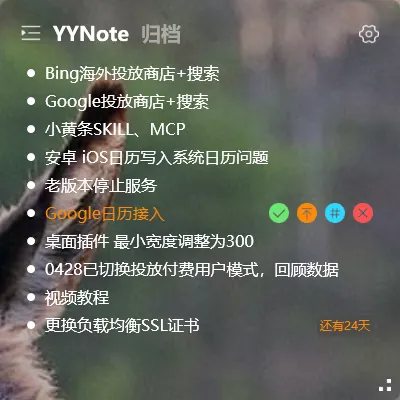
There are many todo tools out there: mobile apps, web apps, spreadsheets… But the best place to keep your tasks is the screen you look at dozens of times a day — your desktop.
Put your todo list on your desktop — every time you switch back, you see it. No need to rely on memory, just visual reminders.
Why Desktop Todo Tools Are Different
Section titled “Why Desktop Todo Tools Are Different”Traditional todo tools — whether mobile or web — all share one problem: you have to open them to see your tasks.
And opening them is often a hurdle. Unlock your phone, find the app icon, wait for it to load, scroll through the list. By the time you’ve done all that, you’ve forgotten what you were doing.
Desktop todo tools are simple: they live on your desktop. Visible at startup, visible when you switch windows, never “closed.”
What YYNote’s Desktop Todo Can Do
Section titled “What YYNote’s Desktop Todo Can Do”YYNote’s desktop widget supports full todo functionality alongside sticky notes and calendar. Enable the desktop todo list, and a transparent floating window appears on your desktop showing your task list.
Reminders: Set a time for your task — a popup notification appears on your desktop at the right moment.
Recurring tasks: Submit your weekly report every Friday? Pay the credit card bill on the 1st? Set it once, it reappears automatically.
Countdown: Set a target date and see “X days left” on your todo. Project deadlines, exam countdowns — the urgency is visible at a glance.
Schedule mode: Convert time-based todos into calendar events. View them on your desktop calendar in month/week/day views.
Everything works from the desktop widget — no need to open the app or switch windows.
Comparison
Section titled “Comparison”| Feature | Mobile Todo App | Web Todo | Desktop Todo Tool |
|---|---|---|---|
| See your list | Open app first | Open browser first | Always on desktop |
| Speed to check | Unlock → open | Open browser → login | Glance at widget |
| Reminders | Push notification | Email/push | Desktop popup |
| Multi-device sync | Usually same ecosystem | Needs internet | Windows/phone/tablet |
| Works without phone | ❌ Must check phone | ✅ Good if on PC | ✅ Desktop native |
If you sit at a computer for more than 6 hours a day, a desktop todo tool is more natural than a mobile todo app.
Who It’s For
Section titled “Who It’s For”Office workers: Staring at a screen all day. Todo list on desktop is the most natural place — see what you need to do as soon as you boot up.
Freelancers: Juggling multiple clients and projects. Desktop todo list with tag filtering keeps everything organized without switching apps.
Students: Track thesis progress and exam schedules. See your deadlines every time you sit down to study — no more procrastination until the last week.
Anyone who forgets things: Desktop todos solve the biggest problem — you don’t need to “remember to check your todo list” because it’s right in front of you.
YYNote offers a 7-day free trial. Put your tasks on your desktop and see if you miss fewer things.
For detailed todo management tips, check the todo management guide.